
Smartico
Integration Guide
Enabling the Integration
Contact your Smartico account manager to enable the Delivyr Integration.
How to send within Smartico
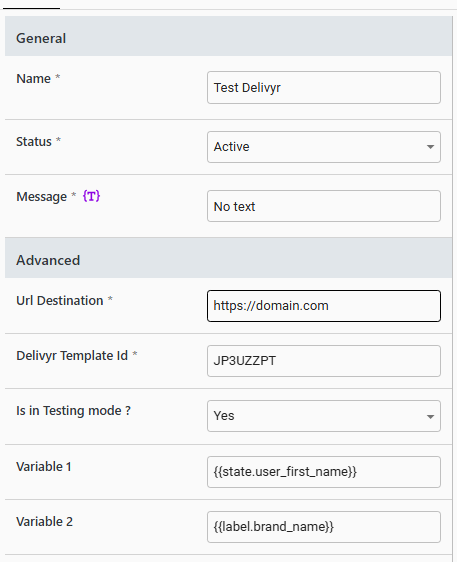
| Attribute | Value |
|---|---|
| Name | Name the message you desire |
| Status | Enable the message |
| Message | Any value. This value will be ignored. |
| Url Destination | This is where you want your recipients of the message to be redirected to. |
| Delivyr Template Id | Retrieve the template you want to send in the Delivyr Dashboard |
| is in Testing mode? | This will determine if Delivyr will actually send out the message to the phone number or not. |
| Variable 1 | The value from Smartico that you wish to put into the template. We recommend templates include the first name to personalize the message |
| Variable 2 | The second value from Smartico you wish you put into the template. |
Example Template in Delivyr
Hello
{{variable_1}}, your balance is{{variable_2}}
Reporting Metrics
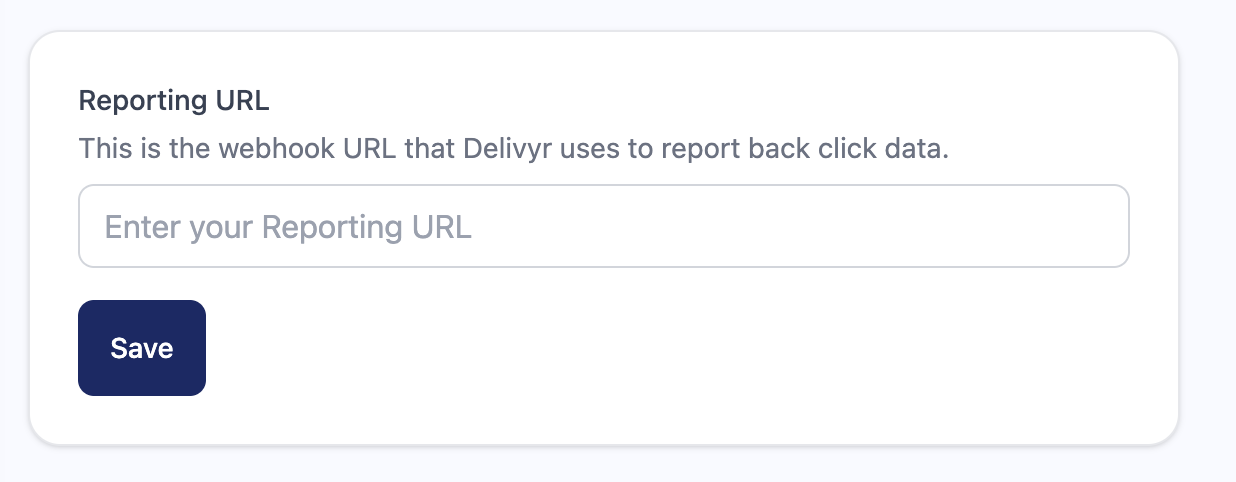
To enable reporting metrics back to Smartico, go in your Delivyr Dashboard and navigate to Integrations -> Smartico and click "Install". Fill in your Smartico Reporting URL, and click "Save"
Updated 2 months ago
Did this page help you?